Our readers are sending more examples of Google sites. This is another example of an excellent site created using Google Site. This is the site (in Spanish Language) for a Tennis Club:
http://www.tenismesalazubia.com/

Tuesday, December 16, 2008

Monday, December 15, 2008
Now you can view PDF documents in Gmail without downloading
Earlier a to view a PDF file received in Gmail will have to be downloaded and opened in Acrobat reader. But now you can view PDF file in Gmail itself.
Now opening up a PDF in Gmail will not open your native PDF viewer (which is relatively slow-to-load), and instead will send you to the document reader built into Google Docs. Clicking “View” quickly opens the PDF inside your browser, complete with the graphics and formatting you expect to see in a PDF. You may have seen this feature before, in Google Docs. It’s the way that we did uploading and viewing of PDFs online.
The Gmail implementation is very useful as it lets you check the PDF file in different zoom views. Users can also search for content in the file in addition to download it for saving.
Of course you can also use the Adobe Acrobat tool which opens the PDF file into the web browser but that usually makes the browser unresponsive for seconds.
Now opening up a PDF in Gmail will not open your native PDF viewer (which is relatively slow-to-load), and instead will send you to the document reader built into Google Docs. Clicking “View” quickly opens the PDF inside your browser, complete with the graphics and formatting you expect to see in a PDF. You may have seen this feature before, in Google Docs. It’s the way that we did uploading and viewing of PDFs online.
The Gmail implementation is very useful as it lets you check the PDF file in different zoom views. Users can also search for content in the file in addition to download it for saving.
Of course you can also use the Adobe Acrobat tool which opens the PDF file into the web browser but that usually makes the browser unresponsive for seconds.
Saturday, December 13, 2008
Google Sites Case Study: Global Alliance for Self Management Support

Global Alliance for Self Management Support (www.globalalliancesms.org) is using Google Sites for their website and collaboration. Global Alliance for Self Management Support is an international non-profit project promoting patient empowerment and self management support worldwide.
This is a case in point about how Google Apps can be used for Not for profit organizations. That too cutting across the geographical borders and collaborating with people worldwide. This Google site has used Google docs forms, Google docs presentations. The site also has Google Apps Knowledge base for those who are creating sites within community.
Manuel Serrano Director of Global Alliance for Self Management Support indicates that they are looking for cyber volunteers to work collaboratively on the development of this collective intelligence platform. He can be reached at manuel [dot] serrano [at] globalalliancesms [dot] org
Friday, December 12, 2008
Google Chrome has been moved out of Beta
 Google after releasing the 15th update for its Google Chrome Web browser and officially ended the beta testing phase for the application Thursday. It already has some 10 million active users. With the 15 updates under its belt, the browser has improved its stability and performance.
"Google Chrome is a better browser today thanks to the many users who sent their feedback and the many more who enabled automatic crash reports, helping us rapidly diagnose and fix issues," they wrote in a Google blog post.
Shortest of Beta Period at Google: The Chrome seems to have spent the shortest period of time in beta status. Considering the previous record of Google which is known for taking its time with beta projects, even in its most popular offerings - this is a healthy development. Launched in September 2008 Chrome was in beta for just three months. If you compare this with Google's Gmail e-mail which began beta testing in April 2004, and more than four years later, the e-mail app is still there.
However Google says that it applies a different time frame and standard to its client software than other offerings. Google also indicated that Chrome was fairly advanced when it was released in beta.
What is new in Google Chrome
- Google Chrome is built on the Chromium open source project, anyone can see features being developed by Google's team and the developer community.
- Chrome now offers users better stability and plug-in performance. Video and audio issues and other common bugs have been fixed.
- Speed has also been a focus and now the javaScript engine runs 1.4 times faster.
- It is now easier to switch between another browser and Chrome with bookmark import and export features. Google also worked to give users greater control of their data. To that end, all features in Chrome that affect user privacy are grouped in one place with an explanation regarding what each one actually does.
Thursday, December 11, 2008
Now chat from Gmail to a mobile through SMS
 Even if the person you are chatting with is not available near PC you can chat with then using this new feature unveiled by Google Gmail - SMS Chat.
Leo Dirac, Google product manager says - "A few weeks back, we ran into a few snags when we first started rolling this out, but starting today you can turn on text messaging for chat,"
You get your own unique Google chat phone number, so the person receiving the texts will be able to know who you are by saving the digits under your name in their phone book.
How to enable Gmail SMS Chat? - just go to the Labs area in Settings to turn it on.
Then- you can type any US phone number into the search box in the chat window on the left, then select “Send SMS.“ You can also select the contact you want to SMS first and then add their phone number. You can send messages to US numbers from anywhere in the world. If you’re on the receiving end, when you get a text message from Gmail on your phone, messages from each contact will come from a unique number with a 406 area code (406 spells G0O…), reply like you would to any other text message and the reply will be routed through Gmail’s servers straight to your friend’s Gmail chat window.
How to block a Gmail sender while chatting from your mobile? Recipients can also block the service simply by sending the word BLOCK in response to a chat message, so you won't be stung by pesky messages all day either.
Google is rolling out this service in the US at the moment, although it appears to be only a matter of time before it will be available in other geographies
Wednesday, December 10, 2008
How to use Tasks in Gmail
One of the most requested features in Gmail - "Task management" has been unveiled by Google. Task management is important especially since it comes as default in most desktop- and web-based email clients.
The fact that task management goes hand in hand with handling email - this will be one of the most use solutions alsong with email. A new tasks management feature is now available in Gmail to let users manage tasks from within the web-based email interface.
Enabling tasks:
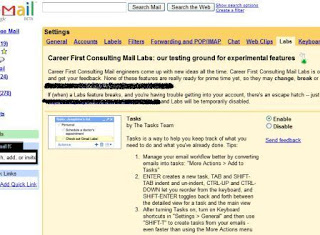 The experimental-only feature first has to be enabled under the Labs tab in the Settings section of the Gmail web interface.
Adding new Task:
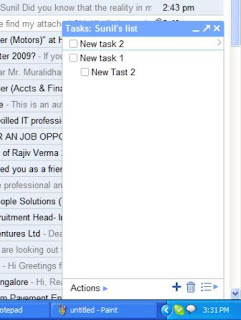
You can access tasks by clicking on the Tasks link right below the Contacts option in the left-hand part of the Gmail web interface, which will open a dialog for creating a new task.
To add a new Task simply press ENTER
Adding New task for email:
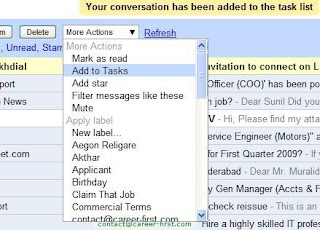 Alternatively, you can turn the currently open email message into a new task by choosing the Add to Tasks option from the drop-down menu labeled More Actions, which will automatically put the message subject as the subject of a new task and provide a link to the email message in the task body.
Managing Tasks:
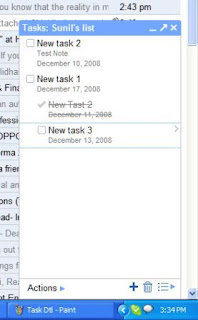
Use Actions Button at Bottom to indent OR Move Tasks up or down
Indent Tasks to List Sub tasks for a Major Task
Click on ">" after a task to edit task Details
Task Details
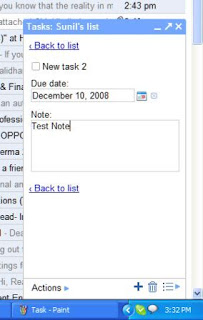 Task details like due date and Task Notes can be edited from Task Detail view.
Tasks Keyboard shortcuts
You can use keyboard shortcuts (if enabled) for Tasks:
- Open Task Box: "g" and then "k"
- Create New Task: ENTER
- Delete a Task: Delete the text and hit BACKSPACE
- Navigate Between Tasks: Arrows
- Indent/Unindent Tasks: TAB and SHIFT-TAB
- Reorder Tasks: drag and drop or CTRL-UP and CTRL-DOWN
- Main View/Detailed Toggle: SHIFT-ENTER
- Create a Task from Email Message: Shift-T (alternatively, choose Add to Tasks from the More Actions drop-down menu)
Since this is experimental Labs feature, it is not yet ready with full features. For instance, the current incarnation of Gmail Tasks lacks basic features like setting reminders, sharing tasks with others or setting task priorities. Tasks integration with Google Calendar that we would expect from Google is also non-existent at this time.
Users who looking for more comprehensive task management features should check applications such as the excellent Remember the Milk service that integrates with Gmail, iGoogle and Google Calendar and provides offline functionality through Gears as well.
Readers can write the comments to this post about their experience with Tasks in Gmail.
The fact that task management goes hand in hand with handling email - this will be one of the most use solutions alsong with email. A new tasks management feature is now available in Gmail to let users manage tasks from within the web-based email interface.
Enabling tasks:
 The experimental-only feature first has to be enabled under the Labs tab in the Settings section of the Gmail web interface.
Adding new Task:

You can access tasks by clicking on the Tasks link right below the Contacts option in the left-hand part of the Gmail web interface, which will open a dialog for creating a new task.
To add a new Task simply press ENTER
Adding New task for email:
 Alternatively, you can turn the currently open email message into a new task by choosing the Add to Tasks option from the drop-down menu labeled More Actions, which will automatically put the message subject as the subject of a new task and provide a link to the email message in the task body.
Managing Tasks:

Use Actions Button at Bottom to indent OR Move Tasks up or down
Indent Tasks to List Sub tasks for a Major Task
Click on ">" after a task to edit task Details
Task Details
 Task details like due date and Task Notes can be edited from Task Detail view.
Tasks Keyboard shortcuts
You can use keyboard shortcuts (if enabled) for Tasks:
- Open Task Box: "g" and then "k"
- Create New Task: ENTER
- Delete a Task: Delete the text and hit BACKSPACE
- Navigate Between Tasks: Arrows
- Indent/Unindent Tasks: TAB and SHIFT-TAB
- Reorder Tasks: drag and drop or CTRL-UP and CTRL-DOWN
- Main View/Detailed Toggle: SHIFT-ENTER
- Create a Task from Email Message: Shift-T (alternatively, choose Add to Tasks from the More Actions drop-down menu)
Since this is experimental Labs feature, it is not yet ready with full features. For instance, the current incarnation of Gmail Tasks lacks basic features like setting reminders, sharing tasks with others or setting task priorities. Tasks integration with Google Calendar that we would expect from Google is also non-existent at this time.
Users who looking for more comprehensive task management features should check applications such as the excellent Remember the Milk service that integrates with Gmail, iGoogle and Google Calendar and provides offline functionality through Gears as well.
Readers can write the comments to this post about their experience with Tasks in Gmail.
Thursday, December 4, 2008
How start up and small business can save money using Google Apps
 Most business these days use Microsoft's Office suite of software applications. MS Office (as it is popularly called) is almost as common as a PC in an office. But using office is also a very costly affair. A cost which can be avoided by start up and small business.
Using Google Apps can reduce your cost multi-fold. Here is a quick assessment on how much you can save in an small office with 10 persons:
MS Office
MS office: $400/licence (Cost $4000)
Hosted Email solution for 10 employees: $114/month (Annual Cost $1368)
Installation and maintenance: $600
Total: $5968
Google has offered something similar for over a year, and like OpenOffice (another free package), it's free. Just sign up for Google Docs, and you can create new spreadsheets, documents and presentations or upload those created by Office or OpenOffice, and export or download them in formats that are also supported by both.
Google Apps
Package cost: Free
Setup cost: $50
Training cost for 10 employees: $500
Ongoing Maintenance: Free
You save: $5968 - $550 = $5418
While not as full-featured as Office or OpenOffice, Google Docs offers much more flexibility. You can share documents with multiple people and even allow them to make changes so multiple people can collaborate. If you're out of town or on vacation, you can review and edit files saved online from any machine with an Internet connection and a web browser.
If you combine OpenOffice (another free open source application) and Google Docs, you'll be able to do anything you currently use Microsoft Office for and more (yes more) at zero cost. There may a training cost for training your staff familiar with Microsoft Office to make them aware of google Apps.
And to be on safe side you can keep one or two full version of Office available just in case you need. Microsoft will soon be releasing a version of Office that will run in an ordinary Web browser, called Office Web Applications. These will be available at a small cost compared to Office but not free.
So before you are writing your check in the name of Microsoft for hundreds of dollars to buy expensive Office licences, you should definitely check out the free alternatives available. And sice they are free - what you are going to lose?
Wednesday, December 3, 2008
New Holiday templates in Google Docs to keep you organized this Holiday season
You can save time and money with the Google Docs template gallery for documents, spreadsheets and presentations. The templates are useful for every one from a small business owner or the chief holiday organizer. The gallery includes a few special templates designed to help you manage holidays this season better. Here are some of the useful templates:
It's easy to get started with any of these tips.
Click File -> New -> From Template to be taken to the main template gallery where you click the "Holiday" category to see just the holiday templates, or you can tab through to filter results by product. Pick the design you like and edit it for your needs.
Read post on Google Blogs (Part 1 Part 2)
- Survey form to update mailing list
- Holiday Postcard
- Mailing Labels
- Gift Tags
- Video Cards
- Newsletter
- Gift certificates
- invitation cards
- RSVP capture to Party
- Budget Tracker
It's easy to get started with any of these tips.
Click File -> New -> From Template to be taken to the main template gallery where you click the "Holiday" category to see just the holiday templates, or you can tab through to filter results by product. Pick the design you like and edit it for your needs.
Read post on Google Blogs (Part 1 Part 2)
Wesleyan University goes for Google Apps
Wesleyan University's (http://www.wesleyan.edu) WSA-ITS Committee has announced announce that the transition to Google Apps for Education has been approved and will go online for the start of the spring semester.
Google Apps will give students many new options in their digital lifestyle, including expanded e-mail capacity, calendaring, and digital collaboration.
Read more
Google Apps will give students many new options in their digital lifestyle, including expanded e-mail capacity, calendaring, and digital collaboration.
Read more
Webinar: Achieve Success on Enterprise-class Google Apps Deployments
Registration is required to join this event.
Date and time: Thursday, December 4, 2008 10:00 am
Pacific Standard Time (GMT -08:00, San Francisco)
Program: Google Apps Webinars
Duration: 1 hour
Description: Achieve Success on Enterprise-class Google Apps Deployments
Topic: Achieve Success on Enterprise-class Google Apps Deployments
Speaker: Customer, (speaker TBD)
Intended Audience: 1000+; IT professionals; Health care; manufacturing, media, retail
Short description: A large pharmaceutical company, Genentech (http://www.gene.com/gene) has recently implemented Google Apps. Learn how Google Apps is used at this leading pharmaceutical company with 12,000 distributed employees. Hear from one of the chief project leads on the people, process and technology considerations that made the deployment a success.
Learn how this leading pharmaceutical maximized the chances for the deployment's success by:
* Phasing in usage of each Google Apps to ensure adoption
* Providing top-notch training materials to educate users
* Identifying "Google Guides" to help train users
* Using marketing tools to create enthusiasm
More and more companies are moving away from traditional/legacy infrastructure and migrating towards a SaaS approach, I really think this webinar will be educational and informational, in terms of gleaming insights and experience from a company that is definitely way ahead of the game when it comes to technology adoption.
To register click here
Date and time: Thursday, December 4, 2008 10:00 am
Pacific Standard Time (GMT -08:00, San Francisco)
Program: Google Apps Webinars
Duration: 1 hour
Description: Achieve Success on Enterprise-class Google Apps Deployments
Topic: Achieve Success on Enterprise-class Google Apps Deployments
Speaker: Customer, (speaker TBD)
Intended Audience: 1000+; IT professionals; Health care; manufacturing, media, retail
Short description: A large pharmaceutical company, Genentech (http://www.gene.com/gene) has recently implemented Google Apps. Learn how Google Apps is used at this leading pharmaceutical company with 12,000 distributed employees. Hear from one of the chief project leads on the people, process and technology considerations that made the deployment a success.
Learn how this leading pharmaceutical maximized the chances for the deployment's success by:
* Phasing in usage of each Google Apps to ensure adoption
* Providing top-notch training materials to educate users
* Identifying "Google Guides" to help train users
* Using marketing tools to create enthusiasm
More and more companies are moving away from traditional/legacy infrastructure and migrating towards a SaaS approach, I really think this webinar will be educational and informational, in terms of gleaming insights and experience from a company that is definitely way ahead of the game when it comes to technology adoption.
To register click here
Google has launched a new Desktop gadget for Gmail
Google has launched a new Desktop gadget that you can use to monitor your Gmail Inbox, read messages, and compose new emails. Check out the announcement on the Gmail blog.
Google released Google Desktop in 2004. Google Desktop is designed to make searching a PC as easy as searching the Web. It provides full-text search over e-mail, files, music, photos, chats, Gmail and Web pages viewed, according to Google. The application includes other gadgets that allow users to be shown new e-mail, weather updates, photos and personalized news.
Here are some of the ways you can use this new Gmail Desktop gadget:
* It doesn't take up much space in your sidebar or desktop, and you can also resize it to show as few or as many messages as you'd like.
* You can also keep two instances of the gadget open - one logged into your personal Gmail account and the other set to Your Google Apps account for work-related stuff. Instead of getting lost in a sea of tabs or browser windows, you can bring up the gadgets in an instant.
Download this Gadget from here
Google released Google Desktop in 2004. Google Desktop is designed to make searching a PC as easy as searching the Web. It provides full-text search over e-mail, files, music, photos, chats, Gmail and Web pages viewed, according to Google. The application includes other gadgets that allow users to be shown new e-mail, weather updates, photos and personalized news.
Here are some of the ways you can use this new Gmail Desktop gadget:
* It doesn't take up much space in your sidebar or desktop, and you can also resize it to show as few or as many messages as you'd like.
* You can also keep two instances of the gadget open - one logged into your personal Gmail account and the other set to Your Google Apps account for work-related stuff. Instead of getting lost in a sea of tabs or browser windows, you can bring up the gadgets in an instant.
Download this Gadget from here
Tuesday, November 25, 2008
Fireforx + Google Apps = FoxGLove Standalone Google Apps Portal
Crafty Firefox user Alex customized his own Firefox Portable installation to tightly integrate with Google Apps. He calls his creation "FoxGLove," and uses it as his own Google-powered productivity portal instead of Microsoft Outlook. Along with his pick of add-ons that enhance and integrate Google Apps in Firefox, Alex tricked out this portable Firefox version with a Chrome-like theme, custom homepages (that auto-load in tabs), web site favicons...
Read full article at lifehacker
Read full article at lifehacker
Tuesday, November 11, 2008
How to do voice and video chat from your Gmail window

Always wanted to do voice and video chat from your Gmail window rather than loggin in to Google Talk every time? Your wait is over!
Here is a new Killer feature from Google! You can now have both voice and video chats with your contacts for free within your browser's Gmail window.
To do this click on the 'Video & more' menu at the bottom of the chat window, then select 'Start video chat' or 'Start voice chat'.
The first time you use this feature, you'll be prompted to download and install a small plugin. Do not hesitate and download the plugin.
This feature is available to all users of Standard, Premier, Education and Partner Editions. However this feature is at present released only in US English.
For more information click below:
Monday, November 3, 2008
CalDAV support enables Google Calendar access from Apple iCal or Mozilla Sunbird
Google Calendar now has CalDAV support. Which means, you'll be able to view and edit your Google Calendar events directly in calendar applications, such as Apple iCal or Mozilla Sunbird. Any changes you make in other calendar applications will automatically appear in Google Calendar the next time you sign in (and vice versa). If you use other calendar applications while offline, changes you make will be saved and updated in Google Calendar when you get back online.
What is CalDAV?
CalDAV is an open protocol that allows calendar access via WebDAV. CalDAV models calendar events as HTTP resources in iCalendar format, and models calendars containing events as WebDAV collections. This allows you to publish and subscribe to calendars, share them collaboratively, sync between multiple users and sync between multiple
Google Calendar at the time of writing this post only supports CalDAV using Apple iCal or Mozilla Sunbird.
To enable Google Calendar in Apple's iCal and Mozilla Sunbird follow the instructions at:
http://www.google.com/support/calendar/bin/answer.py?answer=99358#
There are however few open issues need to be resolved by Google
http://www.google.com/support/calendar/bin/answer.py?answer=99360
I am sure in near future the Google calendar access through other popular client applications will be available.
What is CalDAV?
CalDAV is an open protocol that allows calendar access via WebDAV. CalDAV models calendar events as HTTP resources in iCalendar format, and models calendars containing events as WebDAV collections. This allows you to publish and subscribe to calendars, share them collaboratively, sync between multiple users and sync between multiple
Google Calendar at the time of writing this post only supports CalDAV using Apple iCal or Mozilla Sunbird.
To enable Google Calendar in Apple's iCal and Mozilla Sunbird follow the instructions at:
http://www.google.com/support/calendar/bin/answer.py?answer=99358#
There are however few open issues need to be resolved by Google
http://www.google.com/support/calendar/bin/answer.py?answer=99360
I am sure in near future the Google calendar access through other popular client applications will be available.
Use Google Sites as your Free Web Host
Many times it makes sense to go for a free hosting account rather than spend everything on a paid hosting solution. For example, if you are requirement is that of a simple but professional website on which you do not want to spend much. Or when you just want a temporary site. Or what you are looking is just a plain site to show pictures of your pets.
In all these cases the sites do not require a thousands of MBs as space. For most of your needs 10-12 MB is good enough unless you have lot of PDFs and Videos. As for the bandwidth (there is no problem if you do not understand these terms) also they do not require more than 2 or 3 GBs.
You search on internet and you will find many of the web hosting guys (read sharks) who want to sell the hosting plans. (This may sometime include me also). They will always lead you to buy the most expensive plan they have on some pretext or other. Some will say - "hey you need that bandwidth - go for premium plan" or "Our assisment shows that you need a virtual private server". But remember for a small requirement like this you don’t have to go for them. If you have Google Apps just stick to making a professional website using Google Sites. Contrary to popular belief that Google sites does not have good look and feel or thay have very "templated" look -well if you customize it well and use the images smartly - the site can be very professional. You can try suing the Google Sites. And then if you need - you can always upgrade later on. If you feel Google sites is not good enough, then move on. Anyway here are some advantages and disadvantages who want to evaluate Google Sites.
Advantages:
Disadvantage:
In all these cases the sites do not require a thousands of MBs as space. For most of your needs 10-12 MB is good enough unless you have lot of PDFs and Videos. As for the bandwidth (there is no problem if you do not understand these terms) also they do not require more than 2 or 3 GBs.
You search on internet and you will find many of the web hosting guys (read sharks) who want to sell the hosting plans. (This may sometime include me also). They will always lead you to buy the most expensive plan they have on some pretext or other. Some will say - "hey you need that bandwidth - go for premium plan" or "Our assisment shows that you need a virtual private server". But remember for a small requirement like this you don’t have to go for them. If you have Google Apps just stick to making a professional website using Google Sites. Contrary to popular belief that Google sites does not have good look and feel or thay have very "templated" look -well if you customize it well and use the images smartly - the site can be very professional. You can try suing the Google Sites. And then if you need - you can always upgrade later on. If you feel Google sites is not good enough, then move on. Anyway here are some advantages and disadvantages who want to evaluate Google Sites.
Advantages:
- Google sites has the WYSWIG editors (even year computer savvy child can use it to create a site). Can be used easily by even someone who doesn’t know a thing about HTML. In fact many schools in USA have students using Google sites very regularly.
- No software need to be installed - this is one factor that separates, Google Sites from other free web designing sites. There is absolutely no need of web page development software like dreamweaver or front page. There is no need to learn any software, no struggles with FTP and you got nothing to do with complex scripting.
- Making a website in Google Pages is as easy as blogging. If you have ever blogged using Blogger or Wordpress then you know enough.
- Things like creating a table is easy - all you need to do is to cut and paste from a word document.Or you can just create a new page of that type.
- Adding photos and attachments is as easy as uploading files is easy. By uploading files, you can easily help the reader to download, simply by clicking a link.
- Google Sites can be easily integrated to documents in Google Docs to present data.
- You can create site for your business domain. So your site appears when you typr your business domain name. If you use masked forwarding then the site visitor may not know that the site is created using Google Apps.
Disadvantage:
- It has links to Google Sites (so people will know that you have crated it using Google sites (what is they know?)
- Limitations like fixed templates, fixed site structure and no scripting are allowed
- You don’t have many choices when building the site. There are only a 15-20 of templates provided. You cannot use other templates from other free template sites, or make one using frontage.
- The only way to increase page size is to go vertical. It is also difficult to place links horizontally.
- Google Pages does not allow you to edit HTML of a whole Page, you can edit just sections of it.
Use Google GrandCentral to aggregate your voice mail messages
Some time back Google has acquired a company called GrandCentral. This is a useful service for small business as it gives them ability to get aggregated messages left for your multiple phones.
Google GrandCentral offers a unique phone number which is linked to you for life. GrandCentral doesn't replace your phones; it just link them together and help them do more. How do they achieve that? Well they people One Number for Life - a number that's not tied to a phone or a location - but tied to you. This means one place where you can check your voice messages and have them kept for life.
Here are some of the features provided
Google GrandCentral is currently available to select few by invitation only. That too its present reach is limited to USA. To know more about Google GrandCentral and its features click here
Google GrandCentral offers a unique phone number which is linked to you for life. GrandCentral doesn't replace your phones; it just link them together and help them do more. How do they achieve that? Well they people One Number for Life - a number that's not tied to a phone or a location - but tied to you. This means one place where you can check your voice messages and have them kept for life.
Here are some of the features provided
- Check your messages by phone, email, or online (online like skype voice messages)
- Keep all your messages online for eternity
- Record and store your phone calls (just like voicemail)
- Quickly (and secretly) block an annoying caller
- Click-to-dial from your address book - Google GrandCentral will connect your phone and call the target person
- Surprise your callers with a custom voice mail greeting - you can have separate voicemenl for each phone
- Forward, download, and add notes to your messages
Google GrandCentral is currently available to select few by invitation only. That too its present reach is limited to USA. To know more about Google GrandCentral and its features click here
Saturday, November 1, 2008
Google now offers service level agreement for Premier edition customers
Google now offers service level agreement for 99.99 percent up time to Premier Edition customers. The Service Level Agreement (SLA) will ensure that customers get extra Service credit if they do not meet the desired criteria.
More about the SLA for Google Apps can be read on their website at
http://www.google.com/apps/intl/en/terms/sla.html
This is sure a good news for customers and is another step to reassure enterprise clients.
More about the SLA for Google Apps can be read on their website at
http://www.google.com/apps/intl/en/terms/sla.html
This is sure a good news for customers and is another step to reassure enterprise clients.
Friday, October 31, 2008
Examples of Google Sites usage
Google Sites is definitely more popular among the educational institutes than other type of organizations.
Here are key reasons why Google Sites is very popular tool:
Saline Area Schools (http://www.salineschools.com) is currently using Google Apps (mail, calendar, docs, sites, and videos) and have developed few good websites using Google sites. Here a few well done example sites made using Google Sites by Saline Schools:
Women’s Swim and Dive Team
Heritage PTO
Coach Glennie’s Website
Source: http://blogs.salineschools.com/lupok/
Here are key reasons why Google Sites is very popular tool:
- No technical knowledge required like html, stylesheets or javascript
- Faster way to develop sites
- Can be developed in a collaborative way
- Can access from anywhere to make changes (no software required)
Saline Area Schools (http://www.salineschools.com) is currently using Google Apps (mail, calendar, docs, sites, and videos) and have developed few good websites using Google sites. Here a few well done example sites made using Google Sites by Saline Schools:
Women’s Swim and Dive Team
Heritage PTO
Coach Glennie’s Website
Source: http://blogs.salineschools.com/lupok/
Google users can now

If you have a "Google Account" you now have an OpenID similar to a Yahoo account. For Gmail users your Gmail address is your OpenID.
Google has joined OpenID. By joining the OpenID movement, Google helps all of its Gmail users to the hundreds of websites that accepts OpenID, by providing them a way of accessing without creating an account with that website.
However Google has only become an issuer of OpenIDs and has not indicated that it will accept other OpenIDs for people who want to sign up for Google services. Google appears to be an OpenID "provider," not a "relying party." In other words, you cannot sign into Google with your Yahoo account.
But this still helps the OpenID movement as a whole because it gives smaller sites more incentive to join as "relying parties." Among the first sites to accept Gmail accounts for sign in are Zoho and Plaxo.
View Calendar and Docs in you Gmail
 Some new features are released in Google Labs this week. These include Gadgets to see Google Docs and Google Calendar in Gmail interface.
With the Google Calendar Gadget you can see your Google Calendar agenda and get an alert when you have a meeting.
The Google Docs gadget shows a list of your recently accessed Google Docs and lets you search across all of your documents right from within Gmail.
Another Gadget lets you add any new Gadget by URL.
 To enable these features in your gmail go to your tab of settings >> Labs and enable the desired option and save.
More: Send SMS from your chat. I have not seen this but was told that there is SMS feature which will be enabled (gMark) which will help in sending SMS to mobiles from Google Gmail (like in Yahoo Mail).
Together above gadgets will be killer Gadgets.
Subscribe to:
Posts (Atom)