Microsoft's cloud computing concept Live Mesh platform - is whereby all of our data and applications are stored on the internet as opposed to on the PC. Live Mesh is essentially a web-based operating system, letting users connect all of their devices (home PC, laptop, work computer and, in the not too distant future, handhelds and games consoles) into their own personal mesh. Files and applications can be placed into a "Mesh folder", which lives on the internet and can be accessed by all devices. The Mesh is updated with any changes made to the files or folders the next time the users is connected to the web.
As the competition hots up in the SaaS space - customer is going to benefit. Some of the industry sources indicated that Microsoft may price the application at $5 per month. This may start a price war benefiting the customers in long run. As there is still time of about 1 year for Microsoft to fully come out of closed beta it is testing with 10000 users - Google may speed up some of the new feature roll outs of Google Apps.
Saturday, April 26, 2008
Cloud Computing Developments at Microsoft
Learning from the trend now Microsoft is seriously considering offering its MS Office application online like Google Apps a Cloud Computing application. Industry sources point out that Microsoft conducting tests for technology which will enable Web hosting service providers to offer the Office suite via an emerging technology called application streaming. Such a development means that Microsoft, with the huge data centers, will also start to stream Office directly to its customers as well. Microsoft is already beta-testing a low-end Office bundle, code-named Albany, that it will offer on a subscription basis.

Monday, April 21, 2008
Offline Access for Google Docs
Now you can work on your documents off line when you do not have an internet connections. So you can work on your document while you are waiting at reception or traveling to California.
For offline access - Google Docs is using Google Gears, another open source technology (technically a browser extension) that enables web applications to run offline. So even when you aren't connected to the Internet, Google Docs will use information stored on your computer's hard drive rather than relying on information sent across the network. When you're offline, your edits are stored on your own computer and when you re-connect, your changes are going to be synchronized Google Docs' servers and made available to collaborators.

Cool! I am getting used to this and like this a lot.
For offline access - Google Docs is using Google Gears, another open source technology (technically a browser extension) that enables web applications to run offline. So even when you aren't connected to the Internet, Google Docs will use information stored on your computer's hard drive rather than relying on information sent across the network. When you're offline, your edits are stored on your own computer and when you re-connect, your changes are going to be synchronized Google Docs' servers and made available to collaborators.
How to Enable Offline Google Docs
Here are instructions from Google: To install or enable Gears for Google Docs, click the Offline link in the upper-right corner of your Docs list. (If you do not see this link ask your administrator to enable new features)
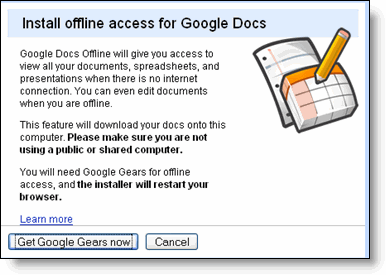
Once clicked you will see the following dialogue box, here click the Get Google Gears now button.
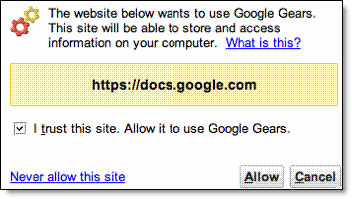
During the process you will be asked to allow https://docs.google.com as a trusted site. Check the box next to 'I trust this site.
Allow it to use Google Gears.' Then, click Allow.
Once you've enabled Google Gears, you'll be able to edit your existing documents anywhere, even without an Internet connection. It will also create a shortcut at your desktop to access offline.
How to access offline?
To access Docs offline, just open a browser and enter the address http://docs.google.com or simply click the Google Docs desktop shortcut, which will look like this:
Cool! I am getting used to this and like this a lot.
Saturday, April 19, 2008
Have Google Apps integrated to your mobile device and office PBX
Esna Technologies is now offering Unified communications for google Applications - Mobility, Presence, Messaging and Google applications all integrated to your mobile device and office phone system.
The Telephony Office-LinX UC gateway for GOOGLE ties the Gmail hosted services to the enterprise telephony infrastructure. Users can link their office desk phone and mobile phone into GOOGLE applications.
When a user receives an urgent email or voice mail, the UC gateway for GOOGLE will turn on their telephone message waiting light. Users can use any telephone to login to their GOOGLE applications with speech and access, manage and respond to all their email, voice mail and fax messages. Office workers leveraging thin clients can simply use a browser with any OS and login to Gmail™ to gain access to their voice messages, faxes and recorded conversations.
Here are some of the key features:
For more information visit: http://www.esnatech.com/google/googleapps.htm
The Telephony Office-LinX UC gateway for GOOGLE ties the Gmail hosted services to the enterprise telephony infrastructure. Users can link their office desk phone and mobile phone into GOOGLE applications.
When a user receives an urgent email or voice mail, the UC gateway for GOOGLE will turn on their telephone message waiting light. Users can use any telephone to login to their GOOGLE applications with speech and access, manage and respond to all their email, voice mail and fax messages. Office workers leveraging thin clients can simply use a browser with any OS and login to Gmail™ to gain access to their voice messages, faxes and recorded conversations.
Here are some of the key features:
Full unified messaging with GOOGLE applications, Gmail and your office PBX. Light up message lights in the office, initiate call notification on email and fax messaging, and the ability to login to Gmail over the phone to access, manage, and compose messages.
Integrate GOOGLE applications with both legacy and IP-based phone systems such as Mitel, Iwatsu, Nortel, AASTRA, Cisco, Avaya, Toshiba, etc.
Ability to integrate multiple PBX with GOOGLE applications at the same time. Perfect for large distributed organizations with branch offices or large campus environments.
Integrates office call logs into a user Gmail™ folder so when users login to Gmail™ they can see who called them, time and date stamp and even duration of conversations.The ability to automatically record office conversations and have them deposited in Gmail™ for full indexing, archiving.
Integrate click-to-dial from GOOGLE applications interface with the office PBX, and registered mobile devices. Users can highlight a number and call from anywhere within GOOGLE applications. This will initiate for both internal and external phone calls. Esnatech UC used intelligent least cost routing by leveraging the office PBX for all call creations.
Import GOOGLE contacts into UC server so users have remote access to contacts over the phone to initiate phone calls and message replies. This also leverages least cost routing rules of the office PBX.
Now any business regardless of size or budget can increase employee productivity and effectiveness while dramatically improving customer satisfaction by simply investing in a Telephony Office-LinX UC gateway and subscribing to GOOGLE applications! No need for a new phone system, no need for any changes to your office hardware.
For more information visit: http://www.esnatech.com/google/googleapps.htm
Salesforce(.com) for Google Apps
Salesforce.com, the market and technology leader in Software-as-a-Service (SaaS) and Platform-as-a-Service (PaaS) and Google on April, 14th announced their global strategic alliance to make it easy for companies of all sizes to run their business in the cloud with Salesforce for Google Apps.
Salesforce for Google Apps is a simple, yet powerful combination of essential applications for business productivity (email, calendaring, documents, spreadsheets, presentations, instant messaging) and CRM (sales, marketing, service and support, partners) that enables an entirely new way for business professionals to communicate, collaborate, and work together in real time over the Web. Salesforce for Google Apps offers a complete way for businesses to harness the power of cloud computing without the cost and complexity of managing hardware or software infrastructure. Salesforce for Google Apps includes:
- Salesforce and Gmail™ – Businesses can now easily send, receive and store email communication, keeping a complete record of customer interactions for better sales execution and improved customer satisfaction.
- Salesforce and Google Docs™ – Create, manage, and share online Google Documents, Google Spreadsheets, and Google Presentations within your sales organization, marketing group, or support team for instant collaboration.
- Salesforce and Google Talk™ – Instantly communicate with colleagues or customers from Salesforce and optionally attach Google Talk conversations to customer or prospect records stored in Salesforce.
- Salesforce and Google Calendar™ – Expose sales tasks and marketing campaigns from Salesforce on Google Calendar. Built by Appirio, this application is one example of a new category of partner extensions to Salesforce for Google Apps.
Subscribe to:
Posts (Atom)